Pros and Cons of SaaS

When it comes to the data center in your company, there are many things you will have to make sure of for it to be in perfect order. These things include the temperature and the air humidity of the data center, that all the software and hardware is functioning properly, all the servers and switches are functioning, and so on. In order to be able to do this, you will have to get to know all the aspects of managing the data center, and one of these aspects will include getting all the available information on the pros and cons of SaaS.

Software as a Service (SaaS)

SaaS is an abbreviation for the term Software as a Service. This basically represents any software in a data center that is used over the internet and is not present on any of the devices that use it. What this means is that a company sells you software you are able to use over the internet without the need to install it or take care of it. Some examples of SaaS are Fortiva or Live Office email services.  Even though this sounds great, here is a list of its pros and cons:

Advantages of SaaS

The most obvious benefit of SaaS is the fact that you don’t have to install the software on your computer, thus saving hard drive space. Also, there is no need to worry about someone illegally copying the software or fixing the problems with it, because it actually isn’t there on the computers.

Disadvantages of SaaS

There are two great drawbacks with SaaS, and one of these is security and the fact that it is used over the internet. The fact that the software in question is used over the internet implies that all the data will be leaving the company network, which is less secure than if it didn’t. Also, if it happens that there are some internet connection problems, the software in question will not be available to end users.

More details on Cloud and Software as a Service are available at Data Center Talk.

Share on TwitterSubmit to StumbleUpon

How to Make Sure that You Have Enough Data Storage Space in Your Data Center

Whichever data center location you choose to go with, data storage will be crucial. Namely, all data center locations should be able to give you enough room to place all the hardware you need for your data center. On the other hand, not all of the data center locations available to you will be good in this respect. Therefore, you should always keep in mind that your data center location should be large enough to accommodate all of the hardware needed to operate a successful data center.

Plan For Your Future Growth

All data centers are not the same, as not all companies are the same. Namely, you might own a company which will need a pretty small data center at first, but as the company gets bigger, the data center requirements will grow alongside it. The main thing that you will need as your company continues to grow is data storage space, and this virtual space will eventually require more physical space in your data center.

Data storage space is basically hard drive space, as hard drives are where all of your precious data is most commonly stored. In order to have enough data storage space for a fast growing company, you will have to make sure that you have enough hardware to provide you with a means to store all of this data. More hardware will automatically mean having more physical space in your data center as well as more electrical power being needed, which will ultimately result in more effort being required to keep the data center’s temperature and humidity level at a desirable level. All in all, the best thing you can do in terms of ensuring that you will not run out of data storage space is to think ahead and choose your data storage location wisely, as moving your data center to another location will always be a hassle.


Read more on Hiring Right Data Storage Services.

To know more about data storage systems, please visit Data Center Talk.

Share on TwitterSubmit to StumbleUpon

Hiring Data Storage Services

Storing their data safely has always been important to people and it doesn’t matter if this is data related to their private lives or to business. Despite the fact that technology has progressed a lot in the last couple of years, it still happens that people lose their valuable data. Now, when it comes to business owners, losing valuable pieces of information can result in financial loss or just be bad for their customers. Taking this into account, more and more business owners have started using data centers and data center services.

Data Storage Options

When it comes to storing data, companies are offered two different options – they can either do this by themselves, or they can hire storage services. Even though a company can store their own data, it is often the lack of information or time that stops business owners from enjoying the benefits of data centers. This then leads to a business owner hiring data center services, which include data storage and data backup services.

Why should I Hire Services?

In spite of the fact that creating a data center is more common that hiring data center services this does not necessarily mean that it is a better solution. Namely, hiring a company that will store the data that is important for your business is in many situations a much cheaper solution than creating your own data center. Creating a data room requires certain things to be done and sometimes a lot of money to be invested. This is especially the case with companies that have offices in many different places. These companies are always better off with hiring data storage services than having a data center for each of their offices. Therefore, it is easy to see when and how a company might decide to hire data storage services. However hiring these services has its benefits and drawbacks that need to be taken into consideration. Make sure you look up and compare the overall costs of hiring the services. Also ensure that the data storage services you are hiring has plans and resources to meet additional requirements you may need in future.

To know more about data storage systems, do visit Data Center Talk.

Share on TwitterSubmit to StumbleUpon

Data Storage and Memory are Two Different Terms

Data Center Management

There are many things you will need to differentiate between and familiarize yourself with when talking about data centers and about data center management in general. Namely, when it comes to data center management, you will have to know everything there is about data centers in order to bring your data center management to the highest level possible. This includes being familiar with ways in which your data center works, ways in which you can improve your data center, and many other things. You will also have to understand the difference between data storage and memory.

Even though many people fail to see the difference between data storage and memory, the fact is that they are two distinct terms.Although both of these are basically systems which any computer uses to process and save data, and both of them are referred to in bytes, the difference between these two terms is substantial and very important to understand.

Data Storage vs Memory

On one hand, you have data storage, which is basically the memory capacity of any computer; also referred to as hard drive space. On the other hand, memory is either random access memory on any computer, or read-only memory. The data stored on your hard drive will be there even after you have turned the computer off, while the data stored in random access memory will disappear as soon as the computer is turned off, i.e the data is volatile. Therefore, if you are, for instance, using the computer to type some text, this text is saved only in random access memory while you are typing it. In order to permanently save it on your computer, you must save it to data storage, meaning on your hard drive.

Read on Types of Data Storage Used in Data Centers.

To keep yourself updated on the latest happenings in the data center industry, please visit us at Data Center Talk.

Share on TwitterSubmit to StumbleUpon

What company owners and executives Need to Know About Cloud Computing

The following is a summary of a paper released by Accenture entitled ‘Six Questions Every Executive Should Be Asking about Cloud Computing’. This overview will quickly summarize the key points in helping you understand what you need to know about cloud computing, and if this is something that your company should pursue.

Question 1: What is Cloud Computing and what is its Path for Utilities?

Cloud computing can be defined as providing IT provisions for hardware, software or services by means of the internet. Cloud computing based functions allow for faster uploading and downloading times along with storage capabilities with no set limits. These variables allow a company to save costs yet have access to more data functions and capabilities as needed.

Some benefits of Cloud Computing are:

  • Very little if any capital investment
  • A pay-per-use price structure
  • Quick acquisitions and deployments
  • Lower operating costs when compared to in-house IT data centers

These benefits have led to two types of cloud computing being made available, Private Cloud and Public Clouds. Private Clouds are built within a company’s existing structure whereas Public Clouds enlist the use of IT functions from a third party.

When deciding which type of cloud computing to use the most common concerns are in the form of security. Is your data secured and can anyone else access your data? Private clouds are perceived as more secure and are a good interim solution.

Utility customers are becoming environmentally concerned. They are opting for online billing and payments in order to have a paperless environment. With these types of changes, the demand for computing power is higher than ever before.

For examples of how consumer based applications can be used in a cloud computing environment, take a look at Microsoft’s Hohm. This is a free application to show consumers how to conserve resources like electricity and natural gas.

Google’s PowerMeter home electricity cloud service allows some customers the ability to read meters through Google servers.

Question 2: What Benefits Can Cloud Computing Bring to My Company?

The top three basic benefits of cloud computing are:

  • Cost
  • Flexibility
  • Speed

When it comes to utilities, the benefits are even greater. With the introduction of smart grid and metering infrastructures the utility world is changing. You need to be aware that smart grid and smart metering are two separate identities. When these two functions are made available in the cloud, storage and speed will be optimized. With the insurgence of thousands of new clients, using cloud computing resources only makes sense. The cloud can easily handle this surge and then maintain a balance once the rush has died down.

Question 3: Can I Count on the Cloud to Save My Organization Money?

When asked this question, Accenture’s own response was that they could see saving as much as 50% on their own IT costs by using cloud computing. When it comes to saving money each organization must take the time to research their needs to see what costs savings they can perceive.

Studies need to be done on ROI’s and the cost of each service and function of the cloud. Each cloud computing service has a different price structure and all of this must be taken into account.

Question 4: How Will Clouds Affect the Way My Organization Operates in the Future?

Cloud computing is set to have a huge impact on a utility’s capabilities and operations when it comes to using smart grids. By analyzing data, outages can be predicted and hopefully prevented. The processing power of cloud computing will create tons of useful data for the utility company. This information can then be used to create products and new features for customers.

By using the cloud, real time services can be offered along with competitive prices plus customers can gain insight into how much power they are using right now! Smart grids will have an enormous impact on renewable energy costs which will help put the utility company in a favorable light. With the expected growth in electric vehicles this demand can be reduced by incorporating green energy practices.

Question 5: What Risks Must My Organization Manage?

The biggest risk for businesses is wondering if their data is secure or if it will get hacked or be given to the wrong people? For utility companies, the need to know local laws and abide by them will be imperative. Questions to ask are “Can you use a cloud service outside of your registered country and are you violating any privacy acts?”

Utilities have different levels of data which are more sensitive than others, so it may be best to store these levels differently on the cloud. The solution could be to use both a private and public cloud mixture. In essence creating an almost semi private/public cloud service.

Question 6: What Are My Next Steps?

Research is the key to making any informed decision. Functions such as Infrastructure, Platforms, Applications and Services must be taken into account. Transferring to cloud computing should involve the entire company and not just the IT department.

When choosing a cloud computing provider, you want to look at what they have in store for the future along with current services. Will they be able to meet your future requirements and keep up with technological advances? Are they ready and able to put new practices in place quickly?

The provider should have the resources to help you plan your needs based upon your budget. They should offer guidance and help your transition to cloud computing be smooth.

Conclusion:

By focusing on these six points as laid out by Accenture in this report, you should easily be able to identify your cloud computing requirements. You will have enough information to analyse how and where you can cut costs, thus ensuring you are not spending more than what is required.

You can also keep up to date with current trends and technology by visiting Data Center Talk where we keep you informed on important changes as they occur.

Read on for Ways To Keep Cloud Costs Low.

Share on TwitterSubmit to StumbleUpon

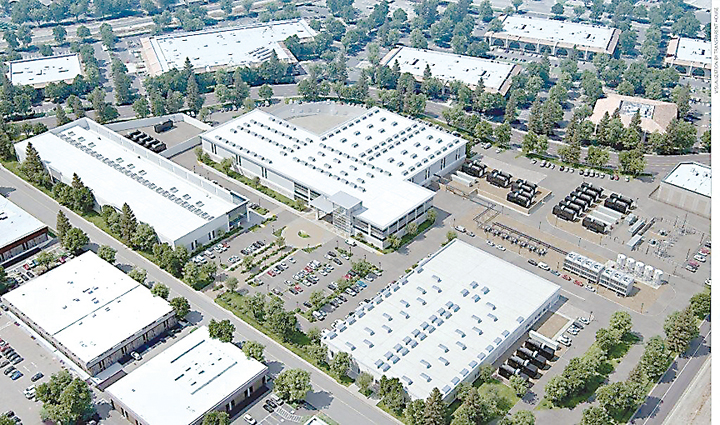
Telx Opens New 32,000-Square-Foot Santa Clara Cloud Connection Center

Telx Opens, New Santa Clara Cloud, Connection Center, Data Center, power calculation, cooling system, fewer generator, Green Data Center, datacenter, data center services, data center management, about data centers, internet data centers, datacenter services, datacenter solutions Business continuity

Interconnection and colocation provider Telx has added 32,000 square feet of high-power density, 2N redundant, energy-efficient space to its C3 Cloud Connection Center portfolio as the anchor tenant of a new Vantage Data Centers facility in Santa Clara.

C3 Cloud Connection Centers

Telx has designed its C3 Cloud Connection Centers to appeal to customers wanting the delivery of cloud services. All its C3 facilities offer advanced cloud services and connectivity solutions from a variety of global providers, collectively known as Telx’s InterConnection community, which is meant to complement the more traditional services offered by colocation providers.

Colocation and Interconnection Services

The Santa Clara location is Telx’s 17th Cloud Connection Center, according to the company’s announcement on Monday, and it will offer premium colocation and interconnection services capable of supporting upto 400 watts per square foot power density (or 16KW per cabinet in a 2N redundant infrastructure design). It also offers direct access to Telx’s customer ecosystem within its C3 data centers at 1100 Space Park facility in Santa Clara and 200 Paul in San Francisco.

Vantage Data Centers campus location

“Leveraging our new Vantage Data Centers campus location, Telx is well positioned to meet the demands of Silicon Valley organizations by offering a rich portfolio of colocation and interconnection services — at the lowest energy pricing — that surpass area competitors,” Telx’s President and Chief Financial Officer, Chris Downie said in a statement. “Now, California-based companies have the option to instantly take advantage of cloud-based services while leveraging unprecedented connectivity to the rest of the world.”

According to a recent GigaOM report, CEO of Telx Eric Shepcaro said dense connections to communication pipelines are crucial to the functioning of businesses. “The biggest data center choke point today is not compute and not storage; it’s the network,” Shepcaro told GigaOM. “With more mobility and machine-to-machine communication, with high-frequency trading and video, our differentiator is our networking.”

latest Addition in Green Data Center

The newly commissioned facility is also the latest addition to one of the most green data center compounds in the country, featuring an innovative design that guarantees a Power Usage Effectiveness rating below 1.3 to maximize energy efficiency.

Telx’s other data centers in the Bay Area are operated by Digital Realty Trust and located at 200 Paul Ave., San Francisco, and 1100 Space Park Dr., Santa Clara.

Last month, Telx announced plans to build a three-story, flagship data center in in Clifton, NJ, adding some 215,000 square feet of high power density, energy efficient space to the company’s C3 Cloud Connection Center portfolio.

To keep yourself updated on the latest happenings in the data center industry, please visit us at Data Center Talk.

Share on TwitterSubmit to StumbleUpon

Three Types of Data Storage Used in Data Centers

Data storage is the most important thing to mention when we are talking about data center IT or computer technology in general. Namely, everything you do on your computer and every piece of information there is in your data center IT is stored somewhere. Even though we hardly ever think about this, our computers can essentially be compared to pieces of paper.

What this means is that all the computers used in, for example, data center IT will start storing data as soon as they are used for the first time, and all this data has to go somewhere. Like computers, notebooks and books also contain some sort of data, but they get bigger and bigger when more data is added to them, which is not always the case with computers.

There are three types of data storage used in any data center, and these three types include the following:

On-site data storage

Basically, any piece of hardware that is designed not to be removed from the computer and stores data falls into this group. The most obvious examples of on-site data storage are hard disk drives and solid state drives.

Removable data storage

As the name suggests, the second type of data storage includes all of those devices that are used for data storage and that can be removed and taken away from the main computer hardware. This is a much more convenient type than on-site data storage devices, and it is widely used today, with USB drives, external hard disk drives and DVDs being widespread.

Off-site data storage

This is the latest type of data storage, where the actual data is stored in a remote location and accessed usually over the Internet. By using this type of data storage for your data center, you will not only save space in your data center, but also keep the data safe from anything that could happen to the on-site hardware.

What is RAID Storage? Read on…

You can also keep up to date with current trends and technology by visiting Data Center Talk where we keep you informed on important changes as they occur.

Share on TwitterSubmit to StumbleUpon

How to Avoid Having Problems with Server Storage

Managing the data center of your company, which is a very important task, can often prove to be a difficult task as well. There are a lot of things you need to pay attention to in order to keep the data center working at all times, as it is in most cases very important that your data center never ‘skips a little’, as we sometimes say. Well, one of the most important things in any data center, if not the single most important thing, is certainly the main server.

Take Care of “The Head”

The main server in the data center is basically the most important hardware and software, and this powerful piece of machinery is what keeps all of your computers going. What this means is that your server is used for data storage and for sending and receiving data to and from all the other computers in the local network; it can be used for many different applications, such as Web services and others.

Keep up with Time and Technology

Whichever of the aforementioned purposes the main server is used for in a data center, it will need to have sufficient storage room in terms of memory capacity. This means that the main server in your data center will need more and more storage room as time goes by, and the lack of server storage can cause you unwanted problems.

In order to avoid the problem of lack of server storage, you will have to make sure that your server is never using too much of the entire memory capacity available for its use. If and when this happens, the easiest and best thing you can do is to simply add another hard drive to the main server in your data center. By doing this, you will make sure that the problem with lack of server storage is addressed and avoided for some time to come.


You can also keep up to date with current trends and technology by visiting Data Center Talk where we keep you informed on important changes as they occur.


Share on TwitterSubmit to StumbleUpon

How clean do you want to be? Outsource or not to outsource Cleaning of a Data Center


How clean do you, Outsource or not to, outsource Cleaning, Data Center, power calculation, cooling system, fewer generator, Green Data Center, datacenter, data center services, data center management, about data centers, internet data centers, datacenter services, datacenter solutions Business continuity

In order to maintain a good level of productivity and to ensure that the equipment can operate at maximum capacity, a clean working environment is important and especially in a data center. A clean working area also affects the productivity of your staff as they will be more motivated to work in clean working conditions. It also gives your potential clients and other visitors a good impression of the company as cleanliness and efficiency often go hand in hand. You need to ensure that your computer rooms, exterior hardware, tops of floor, underfloor plenum cleaning of data center are cleaned periodically.

Penny Saved is Penny Earned

Outsourcing the cleaning services of a data center can reduce costs in the long run and also increase the efficiency of the data center. Having a cleaning staff in-house will require investing in cleaning equipment and cleaning products on a daily basis as well as the necessary staff. Outsourcing the cleaning will eliminate the need for any extra investment as you only have to pay for the cleaning service, which includes the staff and all the equipment that is needed.

Cleanliness is a PROCESS, not a one-time task!

Go Tech!

Another important consideration in favor of outsourcing is that you can choose a specialized company with the necessary skills and experience to ensure that the job is done properly and efficiently and that the correct equipment will be used. A specialized cleaning company will have the knowledge as well as all the latest hi-tech equipment that is needed to keep the data center functioning to its maximum capacity that again minimizes maintenance costs for your company and can also help save resources on training the staff on how best to do the job as quickly and thoroughly as possible.

The specialized data center cleaning companies offer full insurance/liability protection for their clients. These companies train their cleaning technicians year round on the latest standards and cleaning techniques, and always use the right chemicals and latest approved critical environment protocols.

By outsourcing the cleaning of the data center to a professional service you can be sure that the data center will function more efficiently as the cleaning companies have a better understanding and insight into the cleaning and upkeep of the facility. It will also allow you and your team to concentrate on keeping the data center running smoothly without having to worry about the daily cleaning routine as this will be taken care of professionally and efficiently by the cleaning service. Using an outsourced cleaning service can reduce costs and improve operating efficiencies which will allow your company to save money, improve quality and free company resources for other activities.

What YOU can do

Choosing a specialized data center cleaning company is not enough, you need to insist that your staff  follows clean data center practices such as using tacky mats, no food/drink in facility, proper temperature/humidity, employees/vendors cleaning up after themselves thoroughly etc. to achieve a clean work environment.


You can also keep up to date with current trends and technology by visiting Data Center Talk where we keep you informed on important changes as they occur.


Share on TwitterSubmit to StumbleUpon

What Skills Should You Look For When Appointing a Data Center Manager?

Data center, Data center solution, Data center manager, Data center management, Data Center, power calculation, cooling system, fewer generator, Green Data Center, datacenter, data center services, data center management, about data centers, internet data centers, datacenter services, datacenter solutions Business continuity


Managing a data center can often be a demanding job as the manager has to have a good understanding of all of the aspects of the data center in order to keep it operating smoothly and also to foresee any potential problems that may occur in the various departments that may lead to down time or cause other problems.

Understand Data Center up and Running Efficiently

A data center manager not only needs to have a good understanding of general IT issues but he also needs to know and understand other issues that are important in keeping the data center up and running efficiently, like power and cooling, as knowledge of the entire data center facility is vital.

As well as having good general management skills the data center manager has to be aware of the various problems that the power and cooling systems may encounter. Keeping the power system up and running at the correct voltage is essential to keep the data center working efficiently and ensuring that the cooling system is working optimally at the correct temperature is also essential for keeping the hardware operating correctly. Having good knowledge of UPS (uninterruptible power supply) and cooling systems is a good skill to have as a data center manager to have and having knowledge of this can help to keep the data center profitable with little or no down time. It is also important for the data center manager to implement a good power management system to keep the data center working efficiently and to keep it profitable. Variations in voltage can have a negative effect on hardware so it is important to keep the power regulated in order to get the best hardware performance.

Additional Skills of Traditional IT and Operation Management

Data center management requires additional skills compared to traditional IT and operation management mainly because the data center manager has to ensure the data center provides an excellent service 24/7. Managing the people and the processes of the data center on a 24/7 basis is the responsibility of the data center manager to guarantee all aspects of the operation are running efficiently.

Good Project Management Skills

A data center manager should also possess good project management skills that will help them balance the demands of the job and enable them to prioritize the various projects bases on importance.

Well knowledgeable about Remote Management Processes

As more and more companies are turning to cloud computing for their data storage needs data center managers now also need to be knowledgeable in remote management processes as cloud computing is going to become ever more popular in the future.

Well knowladge about Traditional Power Grid and Solar Energy

Also for many data centers the challenge for them is also to become more Eco-friendly and greener and many data centers have already started using alternative power sources like solar energy to reduce emissions as well as the costs of running the data center. One of the main challenges for integrating a solar power system is to make it work seamlessly with the traditional power grid and use it in the right places in order to reduce the daily energy costs of the data center.

You can also keep up to date with current trends and technology by visiting Data Center Talk where we keep you informed on important changes as they occur.

Share on TwitterSubmit to StumbleUpon